SAP Credv2
The following subsections show a representation of the file format portions and how to generate them.
First we need to perform some setup to import the packet classes:
[1]:
from pysap.SAPCredv2 import *
from IPython.display import display
Credv2 without LPS
We’ll read the files used in the test case suite and use them as example:
[2]:
with open("../../tests/data/credv2_lps_off_v0_3des", "rb") as fd:
    credv2_lps_off_v0_3des_string = fd.read()
credv2_lps_off_v0_3des = SAPCredv2(credv2_lps_off_v0_3des_string)

with open("../../tests/data/credv2_lps_off_v1_3des", "rb") as fd:
    credv2_lps_off_v1_3des_string = fd.read()
credv2_lps_off_v1_3des = SAPCredv2(credv2_lps_off_v1_3des_string)

with open("../../tests/data/credv2_lps_off_v1_aes256", "rb") as fd:
    credv2_lps_off_v1_aes256_string = fd.read()
credv2_lps_off_v1_aes256 = SAPCredv2(credv2_lps_off_v1_aes256_string)

with open("../../tests/data/credv2_lps_off_v0_dp_3des", "rb") as fd:
    credv2_lps_off_v0_dp_3des_string = fd.read()
credv2_lps_off_v0_dp_3des = SAPCredv2(credv2_lps_off_v0_dp_3des_string)
The Cred files are comprised of the following main structures:
Credv2 without LPS and version 0 cipher format 3DES encryption
[3]:
credv2_lps_off_v0_3des.show()
###[ SAPCredv2 ]###
  \creds     \
   |###[ SAPCredv2Cred ]###
   |  \cred      \
   |   |###[ SAPCredv2_Cred ]###
   |   |  cert_name = <ASN1_IA5_STRING[b'CN=PSEOwner']>
   |   |  unknown1  = <ASN1_IA5_STRING[b'']>
   |   |  pse_path  = <ASN1_IA5_STRING[b'/secudir/pse-v2-noreq-DSA-1024-SHA1.pse']>
   |   |  unknown2  = <ASN1_IA5_STRING[b'']>
   |   |  cipher    = <ASN1_BIT_STRING[1011100011...0100100001]=b'\xb8\xd7\xa5\x8fM\xe0\x96\xd1\xe8\xcc^4\xeb\xaey!' (0 unused bit)>
Credv2 without LPS and version 1 cipher format 3DES encryption
[4]:
credv2_lps_off_v1_3des.show()
###[ SAPCredv2 ]###
  \creds     \
   |###[ SAPCredv2Cred ]###
   |  \cred      \
   |   |###[ SAPCredv2_Cred ]###
   |   |  cert_name = <ASN1_IA5_STRING[b'CN=PSEOwner']>
   |   |  unknown1  = <ASN1_IA5_STRING[b'']>
   |   |  pse_path  = <ASN1_IA5_STRING[b'/secudir/pse-v2-noreq-DSA-1024-SHA1.pse']>
   |   |  unknown2  = <ASN1_IA5_STRING[b'']>
   |   |  cipher    = <ASN1_BIT_STRING[0000000100...1011010101]=b'\x01\x00\x01\x00n\xd1`\\@\x88...\xec\xafZ6\x88\xd0\xb0\x00\xbe\xd5' (0 unused bit)>
Credv2 without LPS and version 1 cipher format AES256 encryption
[5]:
credv2_lps_off_v1_aes256.show()
###[ SAPCredv2 ]###
  \creds     \
   |###[ SAPCredv2Cred ]###
   |  \cred      \
   |   |###[ SAPCredv2_Cred ]###
   |   |  cert_name = <ASN1_IA5_STRING[b'CN=PSEOwner']>
   |   |  unknown1  = <ASN1_IA5_STRING[b'']>
   |   |  pse_path  = <ASN1_IA5_STRING[b'/secudir/pse-v2-noreq-DSA-1024-SHA1.pse']>
   |   |  unknown2  = <ASN1_IA5_STRING[b'']>
   |   |  cipher    = <ASN1_BIT_STRING[0000000100...0011010100]=b'\x01\x01\x00\x00c\xcb\xb68<\x92...@\t \xe3s\x04\xbe\x85\x18\xd4' (0 unused bit)>
Credv2 without LPS Cipher Header version 1 cipher format
[6]:
cipher_header = SAPCredv2_Cred_Cipher(credv2_lps_off_v1_aes256.creds[0].cred.cipher.val_readable)
cipher_header.canvas_dump()
[6]:

Credv2 Plain Credential
After decrypting the credential using the username provided, the plaintext contains the following structure:
[7]:
cred_v2_lps_off_aes256_plain = credv2_lps_off_v1_aes256.creds[0].cred.decrypt("username")
cred_v2_lps_off_aes256_plain.show()
###[ SAPCredv2_Cred_Plain ]###
  pin       = <ASN1_IA5_STRING[b'1234567890']>
  option1   = None
  option2   = None
  option3   = None
###[ Raw ]###
     load      = b'\xeb<'
Credv2 Plain Credential with DP API
When using SSO Credentials in Windows, the CommonCryptoLib encrypts the PIN using DP API.
[8]:
cred_v2_lps_off_dp_3des_plain = credv2_lps_off_v0_dp_3des.creds[0].cred.decrypt("username")
cred_v2_lps_off_dp_3des_plain.show()
###[ SAPCredv2_Cred_Plain ]###
  pin       = <ASN1_IA5_STRING[b'01000000D08C9DDF0115D1118C7A00C04FC297EB010000006B3FF795A63D2D44B7604E350C2A4ED6040000002A000000430072006500640065006E007400690061006C0045006E006300720079007000740069006F006E000000106600000001000020000000BA59F09CE09554B0728C0B3137DBAA19F2DDF1891E55B8BCBC0944E25111BFF1000000000E800000000200002000000035FCC9DF90BD839D4C346B2A141380496D03CD31CBA9723A286651FAE88323EE10000000E080324A3237B73118103135CB3D305A40000000DC036DA55EDB9ED7670A602C5EDD4B8DE8CDC890D70094117DAA8EF1B3AFBA46D817044F3FDA6EF53694D6CF13CA5AB330025855AEAB657C47F6B2B8972581F2']>
  option1   = <ASN1_IA5_STRING[b'MSCryptProtect']>
  option2   = None
  option3   = None
###[ Raw ]###
     load      = b'\x04\x04\x04\x04'
Credv2 with LPS
We’ll read the files used in the test case suite and use them as example:
[9]:
with open("../../tests/data/credv2_lps_on_v2_dp_aes256", "rb") as fd:
    credv2_lps_on_v2_dp_aes256_string = fd.read()
credv2_lps_on_v2_dp_aes256 = SAPCredv2(credv2_lps_on_v2_dp_aes256_string)

with open("../../tests/data/credv2_lps_on_v2_int_aes256", "rb") as fd:
    credv2_lps_on_v2_int_aes256_string = fd.read()
credv2_lps_on_v2_int_aes256 = SAPCredv2(credv2_lps_on_v2_int_aes256_string)
The Cred files are comprised of the following main structures:
Credv2 with LPS in DP API Mode (Windows)
[10]:
credv2_lps_on_v2_dp_aes256.show()
###[ SAPCredv2 ]###
  \creds     \
   |###[ SAPCredv2Cred ]###
   |  \cred      \
   |   |###[ SAPCredv2_Cred_LPS ]###
   |   |  version   = 0x2 <ASN1_INTEGER[2]>
   |   |  \subject   \
   |   |   |###[ X509_RDN ]###
   |   |   |  \rdn       \
   |   |   |   |###[ X509_AttributeTypeAndValue ]###
   |   |   |   |  type      = <ASN1_OID['commonName']>
   |   |   |   |  value     = <ASN1_PRINTABLE_STRING[b'PSEOwner']>
   |   |  pse_path  = <ASN1_UTF8_STRING[b'C:\\secudir\\pse-v2-noreq-DSA-1024-SHA1.pse']>
   |   |  cipher    = <ASN1_BIT_STRING[0000001000...1101001111]=b'\x02\x01\x00\x0eCredEn...\xd3U\xed\xb7\xfet\x14\xd4\x17O' (0 unused bit)>
Credv2 with LPS in INT/Fallback mode (Linux without TPM)
[11]:
credv2_lps_on_v2_int_aes256.show()
###[ SAPCredv2 ]###
  \creds     \
   |###[ SAPCredv2Cred ]###
   |  \cred      \
   |   |###[ SAPCredv2_Cred_LPS ]###
   |   |  version   = 0x2 <ASN1_INTEGER[2]>
   |   |  \subject   \
   |   |   |###[ X509_RDN ]###
   |   |   |  \rdn       \
   |   |   |   |###[ X509_AttributeTypeAndValue ]###
   |   |   |   |  type      = <ASN1_OID['commonName']>
   |   |   |   |  value     = <ASN1_PRINTABLE_STRING[b'PSEOwner']>
   |   |  pse_path  = <ASN1_UTF8_STRING[b'/secudir/pse-v2-noreq-DSA-1024-SHA1.pse']>
   |   |  cipher    = <ASN1_BIT_STRING[0000001000...0110100010]=b'\x02\x00\x00\x0eCredEn...\xfc\x16\xd3Z3y\xc9\xfb9\xa2' (0 unused bit)>
[12]:
cred_v2_lps_on_int_aes256_plain = credv2_lps_on_v2_int_aes256.creds[0].cred.decrypt("username")
cred_v2_lps_on_int_aes256_plain.show()
###[ SAPCredv2_Cred_Plain ]###
  pin       = <ASN1_IA5_STRING[b'1234567890']>
  option1   = None
  option2   = None
  option3   = None
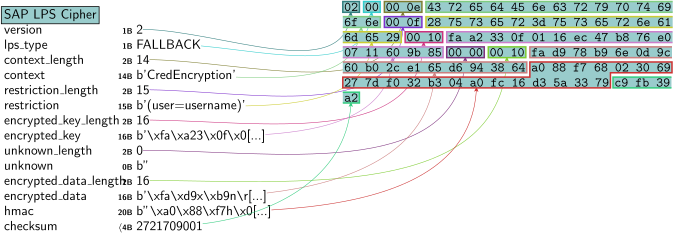
SAP LPS Cipher header
[13]:
lps_cipher_header = SAPLPSCipher(credv2_lps_on_v2_int_aes256.creds[0].cred.cipher.val_readable)
lps_cipher_header.canvas_dump()
[13]: